


Mailtrap has officially released Organization & Sub-Accounts, which can help you manage multiple accounts under a single organization entity, enable better resource sharing across accounts, and streamline permission structures for future scalability.
Separate email activity
Now, you can separate email activity by project, app, client, or team. This allows you to:
- Separate sending data and statistics.
- Avoid mistakes like sending emails to users of a different app or project.
- Monitor issues in one sub-account without noise from others.
- Test emails in isolated environments.
Specific user permissions
Each sub-account can have its own set of users with specific permissions. That means:
- Developers can work on their project without access to other sending projects.
- Clients or external contractors can access only selected resources.
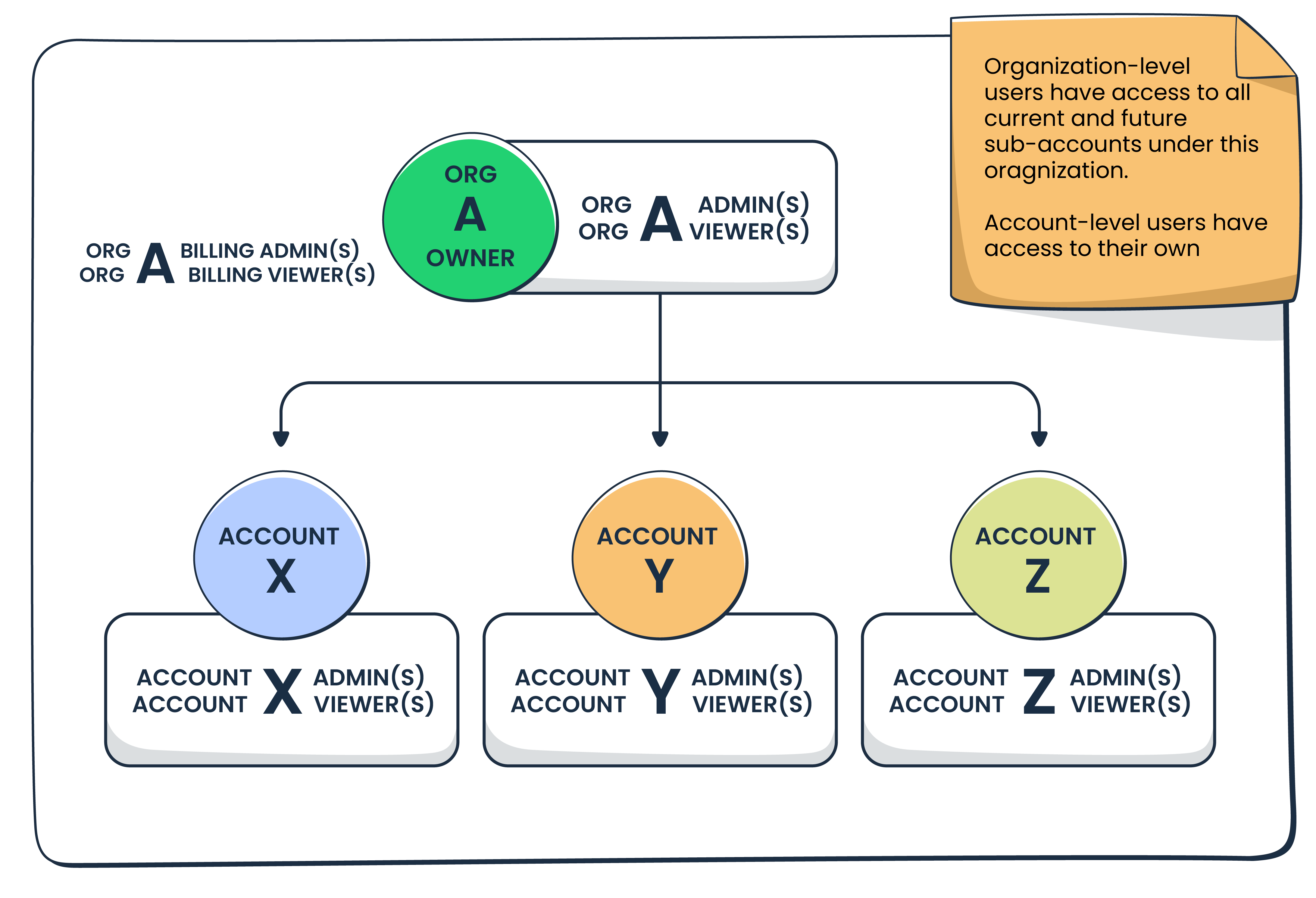
- Organization Admins can access and manage all sub-accounts.
Tip: You can find the description of account-level roles in our dedicated article.


Ye
Marketing lead
Expert
15 years


All your email marketing efforts, from the moment you start email marketing, should lead back, directly or indirectly, to assist the Business outcomes you want. You'll always need Email marketing specific goals (like growing your list, increase engagement) to make those true, so list business and email marketing goals separately and see if one flows in the other
The more detailed the plan and more direct decisions are made, the easier it will be to fill in planning and execute on it. My advice would be to not use Headers in your plan, but to answer questions. Eg: Not "Target Audience" but "Who do we want to reach with our email marketing?
Better organization and management
When you’re managing multiple apps or clients, sub-accounts help keep things tidy since:
- Each sub-account has its own credentials, API keys, and configurations.
- Logs, analytics, and deliverability metrics are scoped to just that sub-account.
- It’s easier to debug and optimize performance per use case.
How the feature works
Let’s say you run a SaaS company with 3 apps and want to create sub-accounts for each tenant in order to give them a secure, isolated, email-sending environment under one system.
In that case, you could create 3 sub-accounts under your Organization, each with its own SMTP credentials, logs, and settings. Your dev team can work on App A without affecting App B, while your ops team can monitor deliverability separately for each app.

Further reading: For a more detailed overview and a set of instructions on how to use Organization and sub-accounts, make sure to read our in-depth knowledge base article. ⬅️